Play link not available
This game doesn't have an active playable link right now. You can check details below.
Scavenger Hunt Seek
About Scavenger Hunt Seek
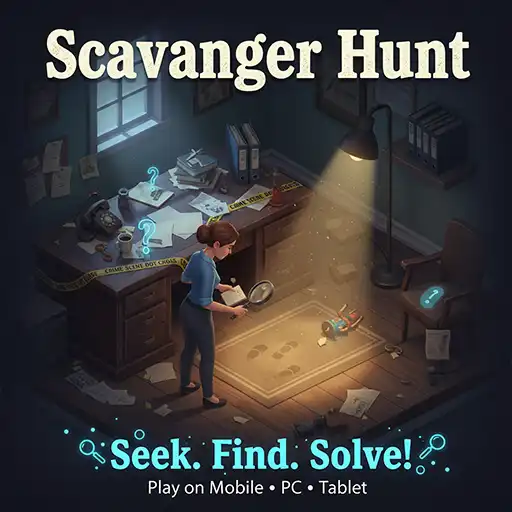
A city block. A ticking clock. Start looking. Scavenger Hunt Seek puts you in a 3D open world with a list of items and a countdown already running. Walk the streets, check around corners, and get in a car if the area is too big to cover on foot. Everything on the list needs to be found before the timer hits zero. Khelogy hosts it completely free, no download, open the page, and you are already standing in the city. Four minutes fifty-two seconds. Go.
What Actually Happens at Each Level?
You spawn into a realistic 3D city. Parking lots, roads, buildings, parked cars everywhere. The hunt list sits on screen, and the clock is already moving.
Items do not glow. They do not float. They sit somewhere in the environment waiting to be spotted beside a wall, behind a vehicle, or around a corner of a building the player has not reached yet. The character walks through the space at ground level, third-person view, full camera control. Nothing is handed to the player.
A car is parked in the environment and is fully drivable. Some sections are too spread out to cover on foot before the time expires. Knowing when to drive and when to walk is the first real decision the game asks for.
Key Features Worth Knowing
- 3D Open World Map — not a flat image, not a locked corridor. A fully walkable city space with real depth. Corners to turn, vehicles to check behind, open stretches that look empty but are not.
- Countdown Timer — starts the moment the level loads. Does not pause. Does not extend. Every second spent retracing steps is a second that does not come back.
- Driveable Car — sits in the environment ready to use. Covers open ground in a fraction of the walking time. Not useful in tight spaces — better to get out and search on foot near buildings.
- Third Person Character — ground-level movement through the environment. The camera follows from behind and rotates freely. Every turn taken could reveal an item or an empty dead end.
- Item List Format — specific objects assigned to each level. No arrows pointing to them. No radar. Find them by actually searching the space.
- Level Progression — clear the full list before time runs out, and the next level unlocks. Later stages expand the search area and add more items to the list without adding more time.
- Realistic City Visuals — the environment looks grounded. Buildings, parked cars, roads, open lots. Nothing cartoonish. Items placed in a realistic space are harder to spot than items placed in a colorful flat scene — that is part of the challenge.
How to Play Scavenger Hunt Seek?
- Stop and Scan Before Moving. The first two seconds of every level are free information. Stand still and look at what is visible from the spawn point. Items placed in open sight near the start get collected for free if the player does not immediately sprint off in a random direction.
- Work Through the Map in Sections. Pick a direction and fully clear it before turning around. Back-and-forth movement wastes time and causes players to miss items that were one building away. Treat the map like a grid — finish one zone, then move to the next.
- Get in the Car for Open Ground Wide parking lots and long straight roads take forever on foot. Grab the car, sweep the open section fast, park near the next building cluster, and continue searching on foot. That switch saves two to three minutes on larger levels.
- Check Behind Every Vehicle. Parked cars are the most consistent hiding spot across every level. Items sit beside them, behind them, and tucked between them regularly. Clear all vehicle clusters before moving to other areas, and the list shrinks faster than expected.
- Look Up. Most players scan at ground level the entire run. Some items sit on ledges, against upper walls, or on raised surfaces. One quick camera pan upward through each new area catches those before the final minute, making finding them stressful.
- Restart Fast After a Failed Attempt. A failed first run on a new level is not wasted. The layout is learned. The second attempt uses that knowledge to move directly to unsearched areas instead of discovering them mid-panic. Restart immediately — do not sit on the game over screen.
Does the Timer Actually Create Pressure?
Early levels, barely. The first couple of stages give enough time to search at a relaxed pace and still finish with a minute to spare.
Then the levels expand. More items. Bigger area. Same clock.
By that point, every wrong turn costs something real. Players who coasted through the opening stages without developing a search pattern start running out of time at the worst moments — two items left, thirty seconds on the clock, no idea which corner they missed.
The car becomes critical by then. Not optional. Critical.
Tips That Actually Save Time
- Never retrace steps without reason. If a zone has been fully walked through, it is done. Move on. Players who circle back to already-searched areas burn the clock and still do not find anything new there.
- Items love parked cars. Behind them, beside them, between them. Check vehicle clusters early every level it consistently knocks out a chunk of the list fast.
- Drive open roads, walk tight spaces. The car clips on buildings and gets stuck in narrow gaps. Know when to leave it parked and continue on foot. Switching between the two at the right moments is the fastest way through any level.
- The last two items are always the hardest. Budget the final ninety seconds specifically for finding those. Do not assume they are somewhere obvious; go back to every area not fully covered and check it properly.
Game Controls
- Mobile — virtual joystick on the left moves the character. Drag the right side of the screen to rotate the camera and look around. Tap items when close enough to collect. Tap the car to enter and drive.
- Desktop — WASD or arrow keys move the character through the environment. Mouse controls camera direction. Click items to collect when in range. Click the car to enter driving mode. Pause button in the top left corner.
FAQ's
Completely free on Khelogy. No account, no payment, no download. Open the browser page, and the level loads immediately.
The level ends unfinished and resets. No permanent penalty. The layout stays the same, so the second attempt benefits from everything learned in the first run.
Yes. A car sits somewhere in the environment in each level and can be entered and driven. It covers open stretches of road and parking areas far faster than walking. Tight spaces near buildings are better searched on foot.
It varies and increases as levels progress. Opening stages keep the list short. Later stages add more items across a wider area without adjusting the timer to match.
Yes. Each new level pushes the search area wider and the item list longer. The spots that are placed in become less obvious, too. A method that works fine in level two stops being enough by level six.
Yes. Scavenger Hunt Seek runs directly in the mobile browser on Khelogy. Touch the joystick, and the camera drag handle everything. No app, no download, open and play.
Yes. The content is exploration and item-finding with nothing inappropriate. The countdown timer and 3D open world add enough challenge for older players, while the concept is simple enough for kids to pick up without explanation.