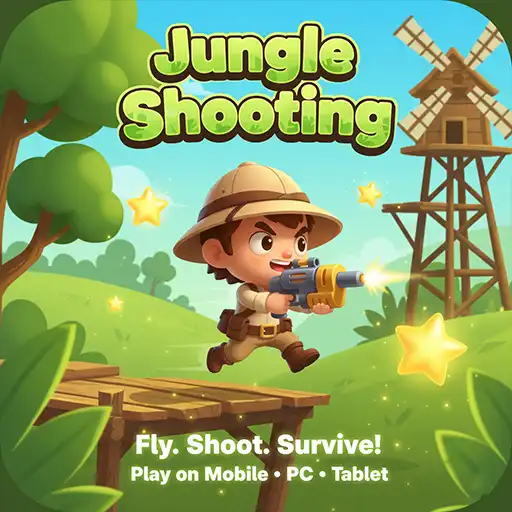
Jungle Shooting Adventure Game
About Jungle Shooting Adventure Game
Jungle Shooting Adventure Game is a free browser-based 2D side-scrolling shooter where an armed adventurer runs through bright countryside terrain, collects stars, jumps over obstacles, and shoots everything that tries to stop the run. Health bar at the top. Distance counter climbing. Enemies appear from the right. Khelogy runs it free in the browser, no download, nothing to install, open the page, and the adventure starts immediately.
What is a Jungle Shooting Adventure Game?
A cartoon soldier. A side-scrolling countryside map. Enemies, stars, and a distance counter that keeps climbing.
The player controls an armed character running left to right through a bright 2D environment, green hills, windmills, trees, and open sky. Stars scatter across the ground and float at various heights along the path. A tank sits waiting further ahead. The character runs automatically or with player input, jumps over obstacles and gaps, and fires at enemies before they can reduce the health bar to zero.
Two buttons handle everything. The jump button on the left launches the character upward. The crosshair button on the right fires the weapon. Those two inputs used at the right moments and in the right combinations carry the run through every section of the map.
The health bar at the top left tracks remaining lives. The star count builds with every collection. The distance meter climbs with every second of forward movement. All three tracks simultaneously, and all three matter for keeping the run going as long as possible.
Key Features Worth Knowing
- 2D Side-Scrolling Format — the map scrolls left to right continuously. New terrain, new enemies, and new star clusters appear from the right side of the screen as the character moves forward. The environment shifts in appearance as the run progresses, with different obstacles and enemy types appearing across different sections.
- Jump and Shoot Controls — two buttons handle the entire game. Jump on the left, shoot on the right. Simple input layout with real depth in how the two work together, jumping and shooting simultaneously, clears airborne enemies that ground-level shots cannot reach.
- Star Collection — gold stars scatter across the ground and at various heights along the path. The running star total sits in the top left corner throughout the session. Stars collected in a single run add to the total and push the session score higher.
- Health Bar — the green bar at the top left tracks remaining health. Enemy hits and contact with hazards reduce it. Losing the full bar ends the run regardless of the distance reached. Managing health by shooting enemies before they get close is the main defensive task across every section.
- Distance Tracker — the meter counter at the top center climbs continuously as the run moves forward. That number is the target every new session is competing against. Beating a previous distance record is the pull that keeps runs going after the first few attempts.
- Enemy Variety — different enemy types appear across the map. The tank visible in the screenshot requires more firepower than basic ground enemies. Later sections introduce faster and more durable enemies that need more shots to defeat before they close the distance and deal health damage.
- Cartoon Visual Style — bright greens, clean sky, cartoon character design, and colorful enemy sprites keep the visual style light and readable throughout. Obstacles and enemies are easy to spot against the background, which keeps the action clear even when the screen fills up.
- Mobile and Desktop — on-screen jump and shoot buttons handle mobile play. Keyboard input covers the desktop. Both control methods work naturally from the first session.
How to Play the Jungle Shooting Adventure Game?
- Shoot Before Enemies Get Close. Every enemy on screen is easier to deal with at a distance than up close. The moment an enemy appears on the right side of the screen, start firing. Enemies that reach the character deal direct health damage. Enemies stopped at range do not. The crosshair button is not a panic response — it is a constant presence throughout the run.
- Collect Stars Without Breaking Stride. Stars sitting directly on the ground path collect automatically as the character runs through them. Stars floating at height require a jump to collect. Before jumping for an elevated star, check what is on the ground ahead. Jumping at the wrong moment can land the character directly on top of an obstacle or into an enemy.
- Time Jumps for Obstacles and Enemies Together. Some sections put a ground obstacle directly in front of an incoming enemy. Jumping over the obstacle while firing at the enemy clears both at once. That timing jump and shoot simultaneously is the core skill the game rewards. Landing the jump and then turning attention to the enemy is slower and riskier.
- Prioritize High-Value Enemies. Not all enemies need to be defeated immediately. A slow-moving ground enemy far to the right is less urgent than a fast enemy closing the distance quickly. Identify which enemies are closest and most dangerous and direct shots at those first before cleaning up the slower ones further back.
- Watch the Health Bar, Not Just the Distance. Distance is the goal, but health is what keeps the run alive. A run that reaches 200m with a full health bar is safer than a run that reaches 200m with one sliver of green remaining. Taking unnecessary hits early in the run by ignoring enemies to chase stars shortens the total distance more than any single missed star collection could have extended it.
- Learn Enemy Placement by Section. The map is not fully random. Certain enemy types and obstacle configurations appear in similar sections in each run. A tank appearing near a windmill in one run will likely appear in a similar position in the next. Recognizing these patterns means the character is already shooting before the enemy is fully visible on screen.
Does the Run Get Harder the Further It Goes?
Early sections feel relaxed. The enemies are spaced out. Stars are easy to collect. The health bar barely moves.
By 100m, that changes. Enemy density increases. Gaps between obstacles close up. The tank and heavier enemies that require multiple shots start appearing more regularly. The character needs to be shooting almost constantly rather than in bursts between calm stretches.
The health bar becomes the most important thing on screen at that point. Players who spent the early section absorbing hits they could have avoided arrive at the harder sections already halfway through the bar. Clean early play shooting enemies at range, avoiding unnecessary damage, is what creates the health margin needed to survive what comes later.
Tips That Push the Distance Counter Higher
Never stop shooting during enemy sections. The crosshair button does not overheat. There is no cooldown. Holding it down continuously through sections with multiple enemies on screen clears threats faster than tapping it when each one gets too close. Constant fire during busy sections costs nothing and prevents most of the health damage that occurs early.
Jump early, not late. The character's jump arc takes a moment to reach peak height. Jumping at the last moment before an obstacle means the arc has not reached high enough when the obstacle arrives. Jump slightly earlier than feels necessary, and the character will clear the obstacle cleanly rather than clipping the top of it.
Collect ground stars first, air stars second. Ground stars require no extra input; the character collects them automatically while running. Air stars require a jump, which takes attention away from incoming enemies. Prioritize the ground stars that cost nothing to collect and only jump for elevated stars when the path ahead is clear of threats.
After a health hit, back off the stars and focus on enemies. Taking a hit is a signal that the run is getting risky. The instinct is to push forward faster to make up ground. The correct response is to be more conservative — shoot everything on screen before moving forward, and let the enemy density reduce before chasing stars again.
Game Controls
- Mobile — jump button on the left side of the screen launches the character upward. The crosshair button on the right side fires the weapon. Both buttons are large enough for comfortable thumb use during active gameplay. Tap and hold the shoot button during enemy-dense sections to maintain continuous fire.
- Desktop — arrow keys or WASD handle movement and jumping. Spacebar or mouse click fires the weapon. The on-screen buttons remain visible and clickable on desktop as an alternative to keyboard input. Both methods respond immediately throughout the run.
FAQ's
Completely free on Khelogy. No account, no payment, no download. Open the page in any browser, and the run starts immediately.
The green bar at the top left represents the character's remaining health. Enemy hits and contact with hazards reduce it. Losing the full bar ends the run and resets the distance counter. Shooting enemies before they reach the character is the main way to preserve it.
Yes. Jungle Shooting Adventure Game runs directly in the mobile browser on Khelogy. The on-screen jump and shoot buttons handle all input on any touchscreen without needing an app or download.
Start shooting the tank the moment it appears on the right side of the screen. It requires multiple hits before being defeated. Getting close to it without having already reduced its health significantly risks taking heavy damage before it can be stopped. Distance shooting is always the better approach against heavy enemies.
Yes. The visual style is fully cartoon with no realistic violence or graphic content. The bright colors, simple controls, and clear on-screen feedback make it accessible for younger players, while the escalating difficulty provides enough challenge to keep older players engaged.